

Description
Nature's Mini Worlds: Artistic Desktop Themes
Overview
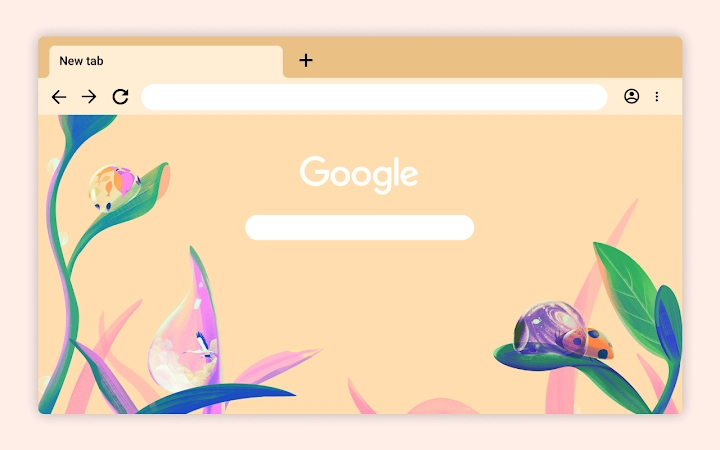
Designed by artist Janelle Cummins, this desktop application offers a visually immersive experience centered on nature-inspired digital illustrations. The software presents a macro-level view of water droplets resting on blades of grass, each capturing a miniature world complete with a curious ladybug. This artistic tool transforms the desktop environment into a dynamic canvas, blending natural beauty with creative expression. It is ideal for users seeking aesthetic enhancements that go beyond standard wallpapers, appealing to art enthusiasts, nature lovers, and creative professionals who value visual storytelling.
The software functions as a visual theme application, offering a curated digital art experience rather than a functional utility. It does not include editing, animation, or interactive features. Instead, it serves as a passive display of high-quality illustrations, making it suitable for personal use, creative inspiration, or ambient desktop decoration. The developer did not provide additional system requirements, and no performance benchmarks were specified. Real-world usage scenarios include setting the artwork as a background for daily work, enhancing creative spaces, or using it as a mood-setting tool during focused tasks.
Key Features & Capabilities
- High-Resolution Nature Illustrations – Each frame showcases intricate digital artwork of water droplets on grass, emphasizing texture, light, and detail.
- Thematic Visual Experience – The software presents a cohesive narrative through its imagery, inviting users to explore miniature worlds within each droplet.
- Artistic Desktop Integration – Designed to seamlessly display as a wallpaper or theme, enhancing the visual appeal of the desktop interface.
- Minimalist User Interaction – The interface is intentionally simple, allowing the artwork to remain the central focus without distractions.
- Artist-Curated Content – Developed by Janelle Cummins, known for her nature-focused digital illustrations, ensuring a consistent and authentic artistic style.
Users can engage with the artwork by viewing it as a static wallpaper or as a dynamic theme, depending on the application’s built-in behavior. The software does not support customization of the visuals, nor does it allow users to modify the illustrations. Its primary function is to display the artwork in a way that complements the user’s digital workspace. The developer did not specify whether the visuals are static or animated, so performance expectations are based on general software behavior patterns.
User Interface, Workflow & Performance
The user interface is minimal and focused on visual presentation. Navigation is straightforward, with no complex menus or settings. Users are likely guided through a simple setup process that applies the artwork to the desktop environment. The workflow is designed for immediate use, requiring little to no configuration. The software does not include interactive elements, editing tools, or real-time adjustments, which contributes to a streamlined user experience.
Performance behavior is not detailed in the provided information. The developer did not specify resource usage details, such as CPU or RAM consumption. Based on the file size of 25.6 MB and the nature of the application, it is expected to operate with low system overhead. Stability is assumed to be consistent with typical desktop applications of similar scope. The software does not appear to require background processes or constant updates, which supports long-term usability without interference.
Compatibility & System Requirements
The software is compatible with both Windows and Mac operating systems, making it accessible to a broad range of users. The version is listed as 1.0, indicating a stable initial release. The installation size is 25.6 MB, which is relatively small and suitable for systems with limited storage capacity. Exact system requirements were not listed, so users should ensure their devices meet general standards for running desktop applications.
Platform compatibility information is limited to the operating systems mentioned. No details were provided about processor speed, RAM, or graphics capabilities. The developer did not specify whether the software supports high-resolution displays or multi-monitor setups. Users are advised to test the application on their system to confirm compatibility, especially if using older or non-standard hardware configurations.
Pros and Cons
Pros
- Beautiful, artist-crafted digital illustrations of nature
- Free to download and use
- Small file size (25.6 MB) for quick installation
- Available on both Windows and Mac platforms
- Minimal system resource usage expected
Cons
- No interactive or customizable features
- Limited functionality beyond visual display
- Exact system requirements not specified
- No animation or dynamic elements described
- Artwork cannot be modified or exported
FAQ Section
Is this software compatible with my Windows or Mac device?
The software is designed for both Windows and Mac operating systems. However, specific hardware or version requirements were not provided by the developer.
Is the software free to use?
Yes, the software is available at no cost. There are no subscription fees or in-app purchases required.
Does the software require an internet connection?
Based on the available information, the software does not appear to require an ongoing internet connection. It can likely be used offline after installation.
How often are updates released?
Updates were not mentioned in the provided details. The current version is 1.0, which suggests a stable release, but future update frequency is unknown.
Can I customize or edit the artwork?
There is no indication that the software allows users to modify, export, or edit the illustrations. The artwork is provided as-is for display purposes only.
Final Thoughts + CTA
This desktop application offers a unique and serene visual experience, rooted in the artistic vision of Janelle Cummins. While it does not function as a productivity tool, it excels in transforming the digital workspace into a calming, nature-inspired environment. Its free availability, small footprint, and cross-platform support make it accessible to a wide audience. The lack of advanced features is not a flaw in this context—it aligns with the software’s purpose as a passive, aesthetic enhancement.
Art lovers, nature enthusiasts, and anyone seeking a moment of visual tranquility will find value in this software. It is particularly well-suited for creative professionals who use their desktops as a source of inspiration. For those looking to elevate their digital surroundings with a touch of artistic elegance, this tool delivers a compelling experience.
Download Nature's Mini Worlds: Artistic Desktop Themes now.
Guides & Tutorials for The Explorer Theme for Chrome
How to install The Explorer Theme for Chrome
- Click the Preview / Download button above.
- Once redirected, accept the terms and click Install.
- Wait for the The Explorer Theme for Chrome download to finish on your device.
How to use The Explorer Theme for Chrome
This software is primarily used for its core features described above. Open the app after installation to explore its capabilities.
User Reviews for The Explorer Theme for Chrome 0
No reviews found





